
You can show and hide one part (a field or a section) of a form based on selections made by the form submitter in another part of the form. In other words, you may wish to hide a text field on a form unless the submitter gives a certain answer in a previous question. You can configure this via the Change Visibility Based on Other Fields setting that's available on all fields.
Note: You can also use AND / OR grouping options when building Conditional Visibility via the All of the following are true and One of the following is true options. This will allow you to reduce nesting of sections and keep complex logic easier to read and manage.
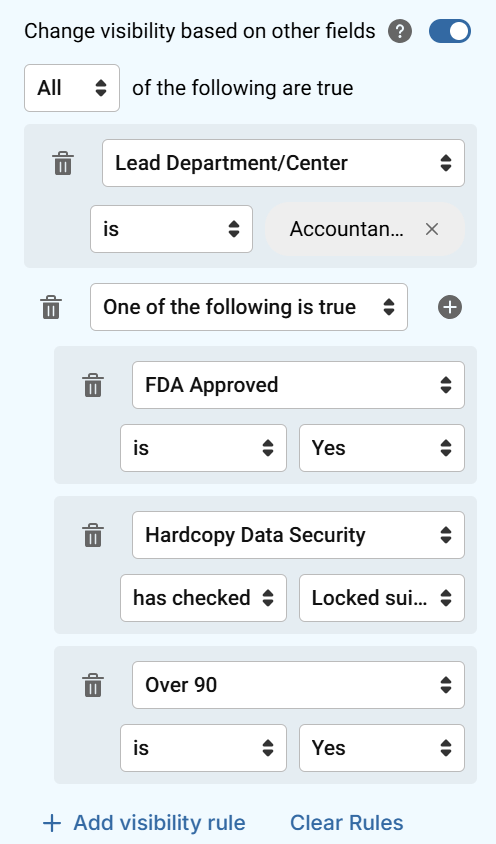
The following example demonstrates how you can set up a field to only display when a specific answer is provided in another. Please note, if you want to limit who can view certain Fields/Sections in a form you can utilize the Limit Availability (sensitive data) gadget configuration.
Multiple Choice
- Drag the Multiple Choice gadget into the center panel of your form.
- Provide a label for the field in Gadget Label/Question. For example, "Are you traveling outside the U.S. or Canada?"
- Using the Presets dropdown, select the Yes/No option.
Country Picker Field based on prior response
Note: This field will only be visible on the form if 'yes' is selected from the multiple choice gadget created previously.
- Drag the Country gadget into the form.
- Provide a label for the field in Gadget Label/Question. For example, "International Destination."
- Toggle the Limit visibility based on other gadgets on, and click Add Visibility Rule.
- In the dropdown that appears, select the field that will determine whether this field will be visible on the form. For example, "Are you traveling outside the U.S. or Canada?"
- Next, select the operator to be used. For example, "Is."
- In the last dropdown, select the value that must be chosen. For example, "Yes."
- The selected rule indicates that when the field Are you traveling outside the U.S. or Canada contains a value of Yes, then the field International Destination will be visible on the form. If any other value is selected, this field will not display.
Comments
0 comments
Article is closed for comments.